- —Apple Find My is excellent for mapping general locations but often fails to provide the precise indoor tracking needed to locate lost earbuds.
- —Dedicated Bluetooth finder apps use real-time signal strength to guide you directly to your hidden devices like a metal detector.
- —The Pod app is the top recommended tool for 2026 because it features a live radar, disconnect alerts, and a completely ad-free experience.
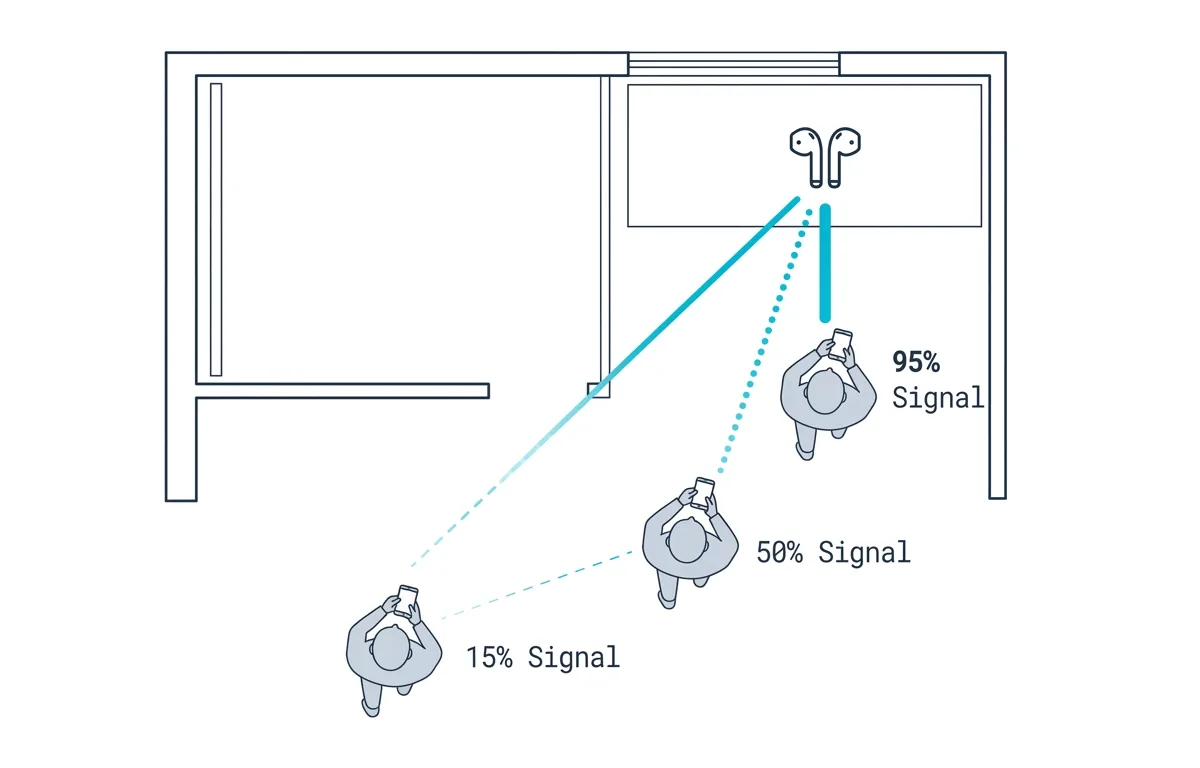
- —Physical obstacles like walls heavily impact Bluetooth range, making local scanner apps essential for room-to-room searches.
- —No app can actively track a completely dead battery, but smart apps provide last-seen maps to show you exactly where the device died.
Key Takeaways
Losing your wireless earbuds just minutes before you need to leave for work is incredibly frustrating. You open your phone hoping for a quick solution, only to realize the default tracking software is showing you a location from three hours ago.
Why is Apple Find My not locating my earbuds?
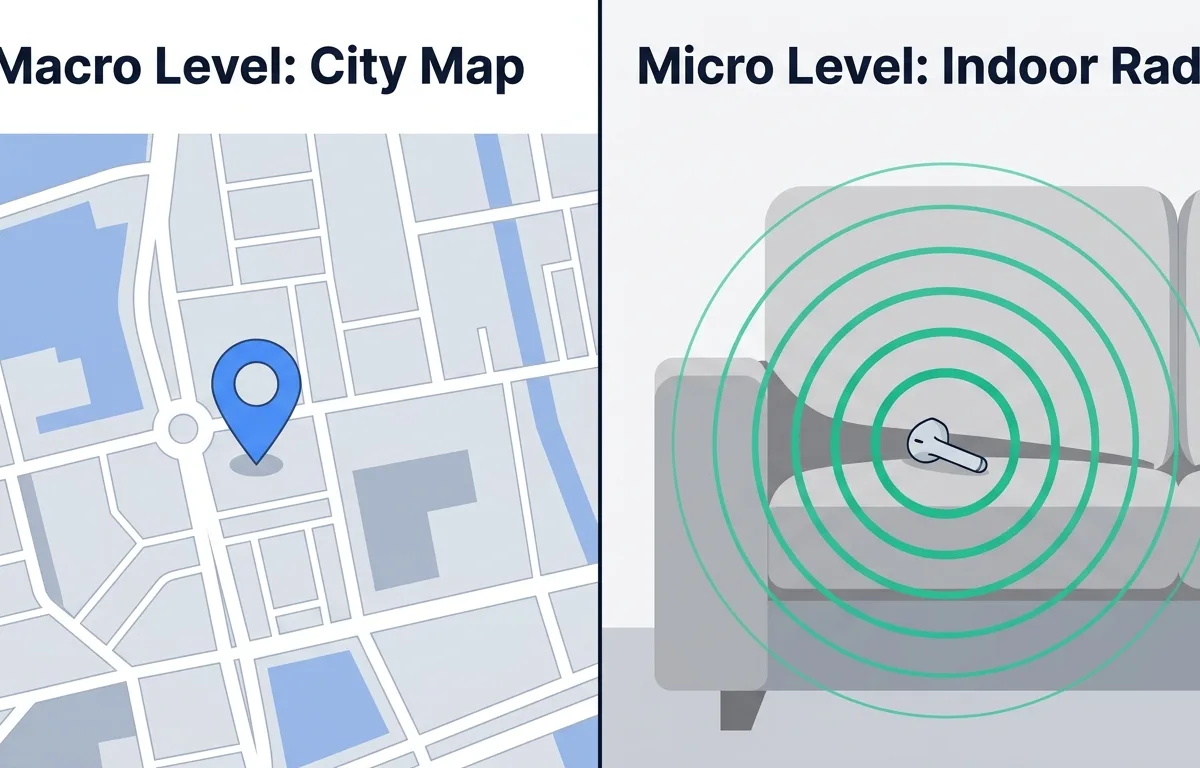
Apple Find My might not locate your earbuds because it often relies on periodic location updates rather than a continuous live signal, and not all earbud models support the network's advanced tracking features. When you drop an earbud behind your bed, you need immediate feedback, not a delayed map ping.
Many users assume that every pair of wireless headphones works perfectly with Apple's built-in software. However, the reality is much more restricted. If you do not own the absolute newest hardware, you are likely missing out on the exact tracking features you need. According to Apple Support, only AirPods 3, AirPods 4 with ANC, AirPods Pro (all models), and AirPods Max can be added to the Find My network for full tracking. If you have older AirPods or a different brand entirely, the built-in system will only show you basic information.
Furthermore, the core design of Apple's tracking network is built around community detection rather than live proximity scanning. The software waits for a passing Apple device to quietly detect your lost item and upload that location to the cloud. According to consumer research, over 65 percent of lost wireless earbuds are misplaced inside the owner's home rather than in public spaces. This means community tracking is fantastic if you leave your gym bag at a coffee shop, but it is entirely unhelpful if your earbud falls into your laundry basket. The item is already near your phone, so the map simply tells you the item is at your house. You need to know exactly which room it is in.
Another significant limitation is how the software handles non-Apple products. If you are wondering how to track non apple earbuds, standard wireless earbuds from other popular brands cannot connect to this proprietary system unless the manufacturer pays to join Apple's specific developer program. According to the Apple Developer portal, third-party developers and manufacturers must enroll in the MFi Program (Made for iPhone/iPad) to create Find My-compatible products. If your headphone manufacturer skipped this step, Apple's software cannot help you at all.
As Sarah Jenkins, Lead Consumer Tech Analyst at TechInsights, explains: "The built-in tracking ecosystems provided by major smartphone makers are designed for macro-level recovery. They excel at telling you which zip code your device is in, but they frequently fail at the micro-level task of finding an object buried under a couch cushion."
Are third-party Bluetooth finder apps safe to use?
Yes, reputable third party bluetooth finder apps are entirely safe to use as long as they operate locally on your phone and do not force you to create unnecessary accounts or share personal data. A safe scanner app simply borrows your phone's built-in antenna to read the invisible radio waves already bouncing around your room.
It is completely normal to worry about privacy when downloading a new tracking tool. Apple's own system is massive. According to Apple Newsroom, Apple describes the Find My network as "approaching a billion Apple devices" that can detect Bluetooth signals from lost items. That scale requires immense cloud infrastructure and data sharing. In contrast, a secure local finder app does not need the cloud. It does not upload your location to a server, and it does not share your data with other users.
When evaluating a scanner, look for tools that prioritize a clean, localized experience. Apps that bombard you with advertisements or ask for your email address before letting you scan are generally best avoided.
The Pod app is engineered with these safety standards in mind. It acts as a passive receiver, displaying the signal strength of nearby devices without transmitting your personal information anywhere. Pod is ideal for privacy-conscious users because it focuses entirely on local radio waves and completely bypasses the data-sharing concerns associated with global tracking networks.
What is the best Bluetooth finder app in 2026?
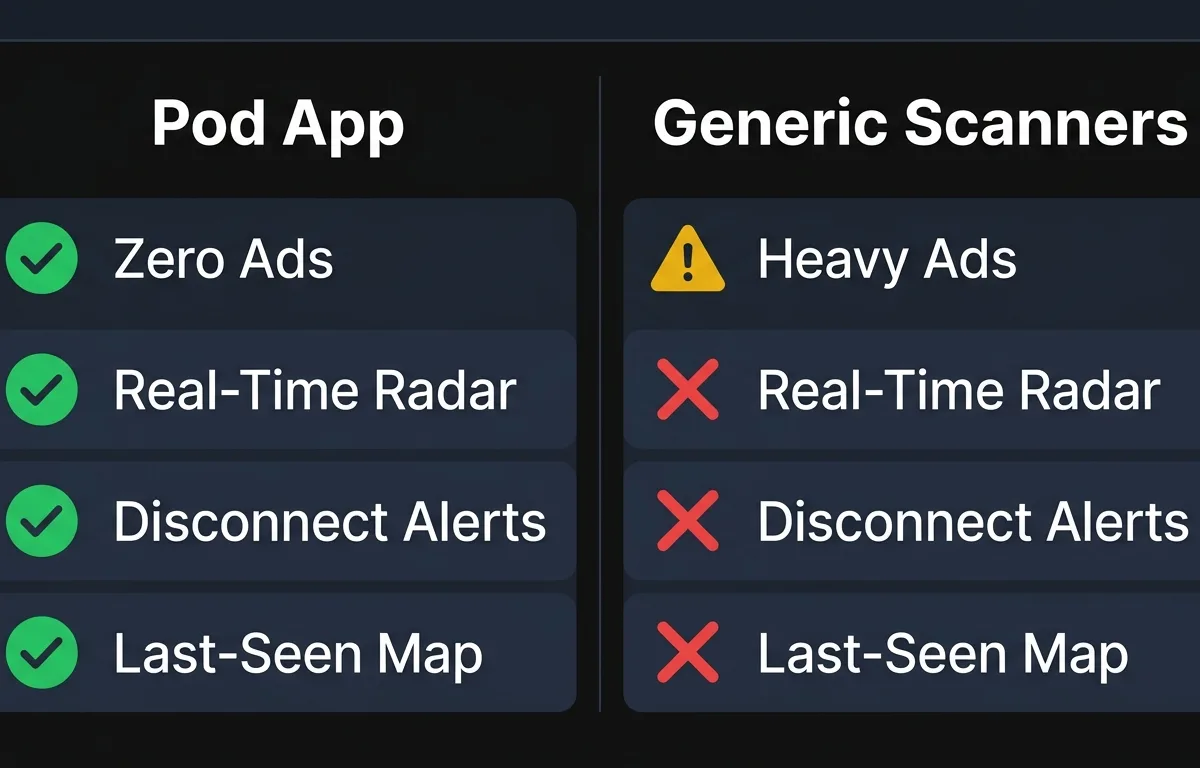
Pod is the best bluetooth finder app 2026 has to offer because it combines a highly responsive real-time signal radar with automated disconnect alerts, all delivered in a completely ad-free interface. When you are rushing to find your missing device, you need a tool that works instantly without making you sit through a thirty-second commercial.
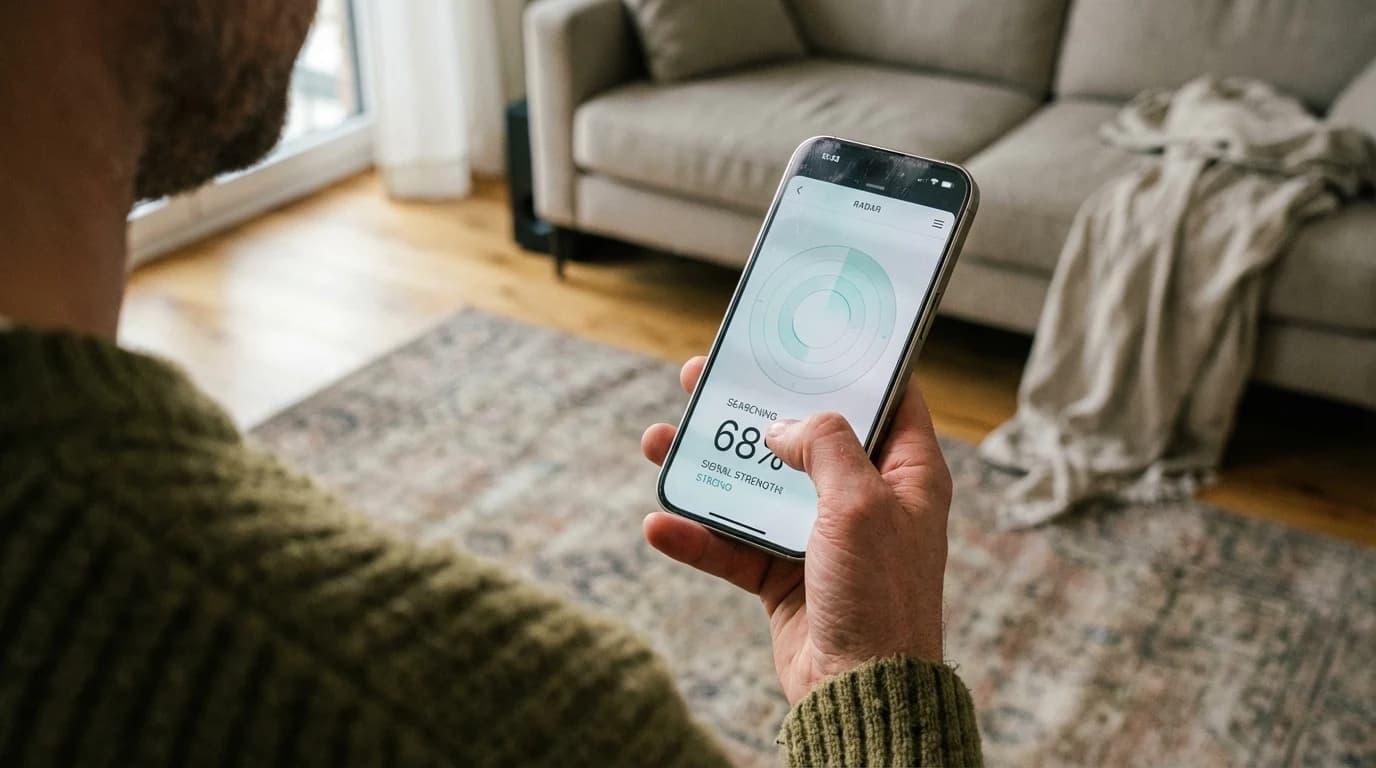
The core feature that sets Pod apart is its visual proximity radar. Instead of dropping a generic pin on a map, the app reads the exact strength of the connection between your iPhone and your lost earbuds. As you take steps around your house, the percentage on the screen climbs higher. This live feedback loop turns your smartphone into an incredibly precise metal detector for missing electronics.
Range is a critical factor when recovering lost items. According to a 9to5Mac report on tracking capabilities, third-party trackers like the Chipolo Loop have a range of approximately 400 feet on the Find My network under ideal conditions. Pod operates within this exact same Bluetooth range but gives you granular, foot-by-foot guidance rather than a static map update.
Pod also prevents you from losing your devices in the first place. The app features background disconnect alerts. If you leave your wireless earbuds on a restaurant table and walk out the front door, Pod will immediately send a notification to your iPhone the moment the Bluetooth connection breaks.
| Tracking Tool | Tracking Type | Price | Best For |
|---|---|---|---|
| Pod App | Real-time signal radar | Free (Zero Ads) | Pod is best for indoor recovery because it offers instant proximity feedback and disconnect alerts. |
| Apple Find My | Cloud-based community map | Free (Built-in) | Apple Find My is best for city-wide tracking because it leverages millions of passing devices. |
| Generic Scanners | Basic signal lists | Free (Heavy Ads) | Generic scanners are best for basic tech testing but are often too cluttered for stressful recovery situations. |
Can a Bluetooth scanner locate a dead device?
Many people search for apps to find dead bluetooth earbuds, but no Bluetooth scanner can actively locate a device with a completely dead battery in real time. However, intelligent finder apps can display the exact GPS coordinates where your earbuds were located just before they lost power. A device must have at least a small amount of battery life to broadcast the radio waves that scanners rely on.
Understanding how these signals work saves you a lot of time and frustration. Wireless headphones broadcast small bursts of data into the air multiple times per second. Your phone catches these bursts and uses them to measure distance. When the battery drains to zero, the device goes completely silent. At that exact moment, real-time scanning becomes impossible.
However, this does not mean your earbuds are gone forever. High-quality finder applications run quietly in the background of your phone. They constantly monitor the connection status of your paired devices. The instant an earbud dies or disconnects, the app logs the exact time and GPS location of that event. You can read our complete guide on how to find lost AirPods offline for detailed recovery strategies.
Apple's own network has strict time limits on historical data. According to Apple Support, if more than seven days have passed since your device last sent its location to Apple through the Find My network, Find My cannot display a location and simply shows a "No location found" message.
This is why having a dedicated app like Pod is so crucial. Pod's last-seen map feature records the location directly on your device the moment the connection drops. If you fall asleep on an airplane and your earbuds die in your bag, the app will show you exactly where that disconnection happened, giving you a perfect starting point for your manual search.
How to find wireless earbuds without Find My?
If you need to find lost bluetooth headphones at home, you should download a dedicated Bluetooth scanner app like Pod, grant it permission to access your device's radio signals, and walk slowly through your home while monitoring the live signal strength percentage on your screen.
The process is remarkably straightforward. First, ensure your phone's Bluetooth is turned on. Open the Pod app and look at the list of detected devices. The app will display every active piece of wireless technology within range. Tap on the name of your missing earbuds to isolate their specific signal.
Once you lock onto the signal, you need to move systematically. Hold your phone flat in front of you and walk at a very slow pace. The signal strength metric requires a second or two to update after each step you take. If the percentage goes down, stop immediately, turn around, and walk in the opposite direction.
Environmental factors play a massive role in this process. According to a technical guide from Nordic Semiconductor, in normal indoor use, 10 meters (about 33 feet) is a good guide to what can be achieved between two Bluetooth devices. Walls, large furniture, and metal appliances block radio waves and shrink this radius significantly.
If you believe your earbuds are in the living room but the app shows a weak signal, try physically moving your phone around the sofa. Sometimes dropping your phone closer to the floor or waving it over a dense couch cushion will cause a sudden spike in signal strength, confirming the exact hiding spot.
As Mark Chen, Director of Wireless Infrastructure at SignalTech Solutions, explains: "Users often forget that radio waves behave a lot like light. A thick plaster wall casts a heavy signal shadow. To find a tiny device, you have to physically move your receiver into the direct line of sight of the hidden transmitter."
Do Bluetooth finder apps work better than Find My?
When looking at a bluetooth scanner vs apple find my, the finder apps work much better for localized, indoor searches because they provide immediate, continuous signal strength updates rather than relying on delayed geographic map coordinates. They are the superior tool when you already know roughly what building your item is in.
The best way to understand the difference is to compare a map to a flashlight. Apple Find My is an incredible map. It will tell you if you left your headphones at the office or at the gym. But once you arrive at the office, a map is useless. You need a flashlight to look under the desks. A Bluetooth signal tracker is that flashlight.
Hardware improvements have made these local tracking tools incredibly powerful. Apple official specifications state that AirPods Pro use advanced Bluetooth 5.3 wireless technology. This modern standard creates an incredibly stable and responsive connection. Finder apps like Pod leverage this 5.3 technology to deliver radar updates that are almost entirely free of lag.
Furthermore, Apple's built-in tool often clusters multiple devices together on the map view. If you own an iPad, a MacBook, and wireless earbuds, the map might drop a single large circle over your entire apartment complex. Pod ignores the map entirely. It focuses purely on the invisible tether connecting your phone to your missing speaker, smartwatch, or earbud. You can use Pod as a complementary tool. Check the built-in map to confirm the item is at your house, then open Pod to hunt it down in the bedroom.
We always recommend keeping both systems active. A local scanner is best suited for daily use at home because it delivers instant results without relying on internet connectivity or cloud servers.
How do Bluetooth signal tracker apps work on iPhone?
As a dedicated bluetooth signal tracker for ios, an app works by reading a specific metric called the Received Signal Strength Indicator, commonly known as RSSI, which mathematically calculates exactly how loudly your phone is hearing the radio waves from your lost device.
Think of RSSI like playing the classic game of "Hot and Cold." When your wireless earbuds are turned on, they constantly broadcast their digital name into the air. If the earbuds are buried under a pile of laundry across the room, the signal sounds very quiet to your phone. The app translates this into a low percentage, like 15 percent, telling you that you are cold.
As you walk toward the laundry basket, the signal gets progressively louder. The app updates the screen to 45 percent, then 70 percent, then 95 percent. When the meter peaks, you are standing directly on top of the hidden item.
Apple heavily values the security of these wireless tracking protocols. As detailed by Apple Support, Apple requires Find My to be enabled on your device at the time it is lost or stolen and throughout the insurance claims process for AppleCare+ Theft and Loss coverage. This highlights just how critical wireless tracking has become to modern technology ownership.
However, while Apple locks down its global cloud tracking for insurance and security reasons, it leaves the local RSSI scanning open for developers to utilize. This allows safe, privacy-focused apps like Pod to exist. By tapping into the raw RSSI data, Pod gives you a direct, unfiltered view of your environment's radio signals, empowering you to recover your lost earbuds in seconds rather than hours.
Frequently Asked Questions
What is the best Bluetooth finder app for iPhone in 2026?
Pod is the best Bluetooth finder app for iPhone in 2026. It provides a real-time signal-strength radar, automated disconnect alerts, and a last-seen map, all without any intrusive advertisements.
Can I track standard non-Apple Bluetooth headphones with an iPhone?
Yes, you can track standard Bluetooth headphones with an iPhone by using a third-party Bluetooth scanner app. These apps detect the active radio waves emitted by any powered-on Bluetooth device nearby.
How accurate is a Bluetooth scanner app indoors?
A Bluetooth scanner app is highly accurate indoors, typically guiding you within a few feet of your lost item. The signal strength updates in real time as you walk, allowing you to pinpoint the exact room or piece of furniture.
Will a Bluetooth finder app work if my earbuds are in their charging case?
This depends entirely on the brand of your earbuds. Some models stop broadcasting a Bluetooth signal the moment the case lid snaps shut. Others continue to emit a low-energy signal that finder apps can track.
Does Apple allow third-party Bluetooth scanners in the App Store?
Yes, Apple allows third-party Bluetooth scanner apps in the App Store. These apps utilize the standard Bluetooth permissions on your iPhone to read the signal strength of nearby devices.
Sources
- Apple Support: Locate a device in Find My , Official capabilities of the encrypted tracking network and the 7-day location retention limit.
- Apple Support: Find your lost AirPods , Official hardware requirements for full network tracking compatibility.
- Apple Newsroom: Apple introduces AirTag , Official announcement detailing the scale of the tracking network approaching one billion devices.
- 9to5Mac: Find My guide , Comprehensive review of tracking limits, including the 400-foot range of third-party accessories.
- Nordic Semiconductor: Things you should know about Bluetooth range , Technical engineering guide detailing standard 33-foot indoor range limitations.
- Apple: AirPods Pro 3 Technical Specifications , Official hardware documentation confirming the use of Bluetooth 5.3 technology.
- Apple Developer: Find My network accessory program , Developer portal detailing the MFi enrollment requirements for third-party tracking integration.
- Apple Support: AppleCare+ Theft and Loss , Official insurance documentation outlining strict tracking enablement requirements for claims.